NCMEC CyberTipline
重要適用提醒 本頁是 Coop 與美國 NCMEC CyberTipline 技術整合的翻譯,不構成台灣法律意見。請勿只依本文件啟用正式通報。組織應先由具資格的法律、兒少安全、資安與事件應變人員確認申請資格、資料處理權限、測試方式、保存義務、跨境傳輸、通報對象與失敗處理。
Coop 整合 National Center for Missing and Exploited Children(NCMEC)的 CyberTipline Reporting API。Coop 處理完整生命週期,包括透過雜湊比對或 AI Rule 偵測已知 CSAM、將內容送至專用 NCMEC 人工審查 Queue,以及提交含相關 metadata 的 CyberTip。
內容審查員工作流程見兒少安全通報。
要求
開始審查並向 NCMEC 通報內容前,需要具備下列條件。
- 完成 NCMEC Electronic Service Provider(ESP)registration 並取得核准
- CyberTipline API 憑證,包括 NCMEC 提供的 username 與 password,用來向 CyberTipline API提交 Report
- 具有
creatorIdField 的 User Item Type。NCMEC Job 以使用者為中心,不以個別內容為中心。Coop 透過內容 Item 的creatorIdField 取得使用者。該 Field 是參照 User Item Type 的RELATED_ITEM,接著彙整與該使用者相關的所有媒體,建立單一 NCMEC 審查 Job - 專用 NCMEC 人工審查 Queue,供 Coop 路由 Job。Queue 中的 Decision 會送出真實 CyberTip 或進入 NCMEC sandbox,由 Coop server 的
NCMEC_ENVenvironment variable 控制,詳情見測試與正式提交 - Additional Info endpoint,選填但強烈建議。Coop 在提交 CyberTip 前呼叫此 webhook,取得電子郵件、screen name、IP capture events 與每項媒體的詳細資訊。未設定時,只會使用 user ID 與 Item data 中的基本資訊提交
- Preservation endpoint,選填。CyberTip 成功提交後,Coop 呼叫此 webhook,讓平台依 NCMEC 要求保存相關使用者資料。Coop 沒有內建資料保存功能,只會在設定後呼叫所提供的 endpoint
- 在 Coop 的 Settings → NCMEC 完成上述 NCMEC 組織設定,詳情見下方 NCMEC settings
雜湊比對(HMA)
若要透過雜湊比對自動偵測已知 CSAM,需要 NCMEC Hash Sharing API 憑證。請在 HMA curator 使用者介面設定,或在 HMA service 使用 TX_NCMEC_CREDENTIALS environment variable。
詳情見 Hasher-Matcher-Actioner(HMA)整合。
NCMEC settings
請從 Settings → NCMEC Settings 設定 NCMEC 通報。
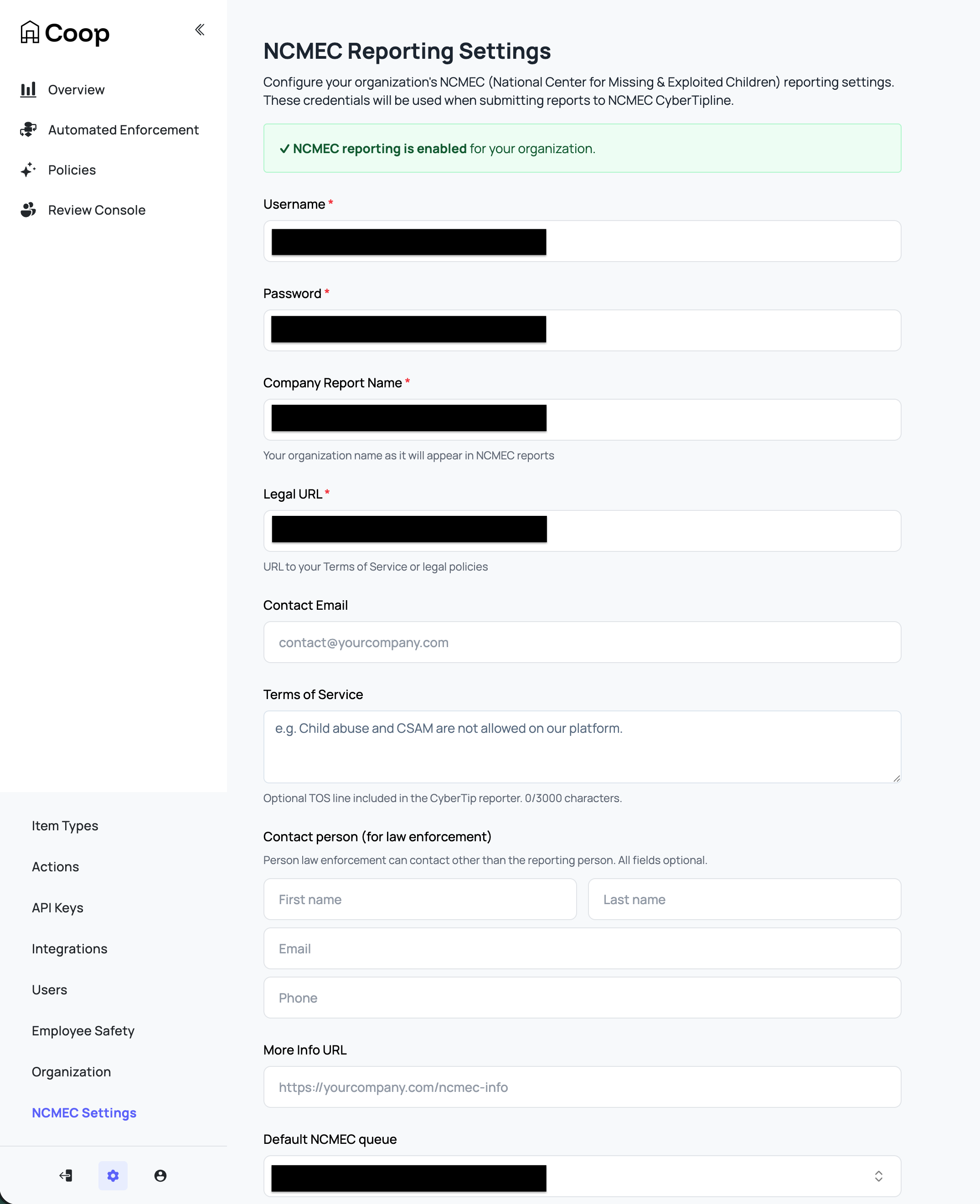
| 設定 | 說明 |
|---|---|
| Username | NCMEC CyberTipline API username |
| Password | NCMEC CyberTipline API password |
| Company Report Name | 組織在 NCMEC Report 中使用的名稱,也會在每份 CyberTip 中作為遭通報使用者的 ESP service name |
| Legal URL | 服務條款或法律政策網址,例如 https://yourcompany.com/terms |
| Contact Email | CyberTip 通報人的電子郵件。NCMEC 傳回的 XML receipt 可作為 ESP 通知 |
| Terms of Service | 與遭通報事件相關的 TOS 文字或 acceptable use policy 網址,最多 3,000 字元 |
| Contact Person (for law enforcement) | 執法機關可聯繫的人員,與通報聯絡電子郵件分開,包括名字、姓氏、電子郵件與電話 |
| More Info URL | 通報流程補充資訊網址,例如 https://yourcompany.com/ncmec-info。當 Default Internet Detail Type 設為 Web page 時,作為 web page URL |
| Default NCMEC Queue | 審查員點選 Enqueue to NCMEC 後,Job 送至此 Queue。保留 Use org default queue 時,改用組織預設 Queue |
| Default Internet Detail Type | 每份 CyberTip 包含的事件脈絡或媒介,包括 Web page、Email、Newsgroup、Chat/IM、Online gaming、Cell phone、Non-internet 或 Peer-to-peer |
| NCMEC Additional Info Endpoint | 提交 CyberTip 前,Coop 呼叫此 webhook 取得補充使用者與媒體 metadata。詳情見 Additional Info endpoint。強烈建議設定,否則只會提交最低限度的使用者資料 |
| NCMEC Preservation Endpoint | CyberTip 成功提交後,Coop 會將 Report ID 傳送至此 webhook。詳情見 Preservation endpoint |
保存 credentials、Company Report Name 與 Legal URL 後,會為組織啟用 NCMEC Reporting。其他 Fields 並非提交 CyberTip 的必要欄位,但填寫後可讓 NCMEC 調查人員更容易採取行動。
將內容路由至 NCMEC
內容可透過三種自動偵測路徑與一種人工路徑送至 NCMEC Queue。人工升級及內容進入 Queue 後的彙整方式,見兒少安全(NCMEC)。
1. 雜湊比對已知 CSAM(HMA)
Coop 整合 Meta 的 Hasher-Matcher-Actioner(HMA),將上傳媒體與 NCMEC 已知 CSAM 雜湊資料庫比對。這是最可靠的偵測路徑。雜湊符合是內容被確認為已知 CSAM 的強 Signal。
HMA 透過 NCMEC Hash Sharing API同步雜湊,讓平台在本機取得 NCMEC 已知 CSAM 圖片與影片指紋資料庫,以快速比對。
詳情見 HMA 整合。
2. 新出現的 CSAM 偵測(Content Safety API)
對於先前未見、沒有已知雜湊的內容,Coop 整合 Google Content Safety API,分類圖片是否可能為 CSAM。您可以建立使用 Content Safety Signal 的 Routing Rule,將高信心結果直接送至 NCMEC Queue,也可先送至初步分類 Queue,經人工審查後再升級。
詳情見 Google Content Safety API。
3. 標記為 CSAM 的新進 Report
平台將使用者 Report 傳送至 Coop Report API,並設定 reportedForReason.csam: true 時,Coop 會自動送至 NCMEC Queue,不使用預設審查 Queue。這些 reason 應由平台 Report 流程設定,並與平台定義的檢舉理由一致。
{
  "reporter": { "id": "user123", "typeId": "user-type-id" },
  "reportedAt": "2025-01-01T00:00:00Z",
  "reportedItem": {
    "id": "content456",
    "typeId": "post-type-id",
    "data": { ... }
  },
  "reportedForReason": {
    "csam": true
  }
}
4. 人工升級
在任何審查 Job 中,具有 NCMEC 存取權的內容審查員都可從 Action 清單選擇 Enqueue to NCMEC,立即將 Job 移至 NCMEC Queue。
CyberTip 提交流程
審查員提交 CyberTip 時,Coop 依序進行下列步驟。
-
取得補充資訊:呼叫 Additional Info endpoint,取得使用者電子郵件、screen name、IP capture events 與每項媒體的詳細資訊
-
建立 CyberTip XML:彙整完整 Report
escalateToHighPriority:boolean,將 Report 標示為高優先順序,例如虐待正在發生,供 NCMEC 分類時優先處理- Incident summary:審查員選擇的 incident type,以及最近建立媒體項目的 timestamp,作為
incidentDateTime - Internet details:事件發生的 channel 或 medium,例如 Web page、Chat/IM、Email,由 NCMEC 組織設定中的 Default Internet Detail Type 決定
- Reporter:組織名稱(
companyTemplate)、Legal URL、Contact Email、選填的 Terms of Service 文字,以及選填的執法機關聯絡人,全部來自 NCMEC 組織設定 - Reported user(
personOrUserReported):疑似行為者。Coop 包含下列資訊espIdentifier:使用者在平台內部的 IDespService:組織名稱,來自companyTemplatescreenName:使用者 username,來自 Additional Info endpointdisplayName:使用者 display name,若有email:已知電子郵件地址,來自 Additional Info endpointipCaptureEvent:與使用者相關的 IP addresses,例如登入與上傳事件,來自 Additional Info endpoint。提供 IP 資料會顯著改善 NCMEC 辨識及定位嫌疑人的能力。若 User Item 的 Item Type 將ipAddress對應至 schema Field role,該 IP 也會以Unknownevent 及 Report incident time 加入
- Victim:若能辨識兒少被害人,例如來自 messaging 脈絡,Coop 會加入其
espIdentifier、screenName、displayName與ipCaptureEvent,協助 NCMEC 定位並提供協助
-
提交 Report:Coop 以 POST 將 Report XML 送至 NCMEC CyberTipline API,並取得
reportId -
上傳媒體:Coop 針對每項媒體,從網址下載檔案並上傳至 NCMEC,附上完整檔案 metadata
- Industry classification(A1/A2/B1/B2)
- File annotations,審查員選擇的 labels
- 與上傳相關的 IP capture events。若 Media Item 的 Item Type 將
ipAddress對應至 schema Field role,該 IP 也會以Uploadevent 及媒體createdAt加入 - 內容是否曾在平台公開,
publiclyAvailable - ESP 是否查看檔案與 EXIF data,
fileViewedByEsp: true、exifViewedByEsp: true - Additional Info endpoint 提供的 file hash,若有
-
上傳補充檔案:Additional Info endpoint 回傳的其他檔案,例如螢幕截圖與佐證資料,會以 supplemental reported files 上傳至 NCMEC
-
上傳 message threads:若使用者在 messaging 脈絡遭到 Report,Coop 會為每個 conversation thread 建立 CSV 並上傳至 NCMEC
-
完成 Report:呼叫 NCMEC
/finishendpoint 完成提交 -
保存 Report:將完成的 Report,包括 Report ID、XML 與所有媒體詳細資訊,保存至 Coop database
-
傳送 preservation request:若組織設定 Preservation endpoint,Coop 會將 Report ID 傳送至該 endpoint,供平台保存相關使用者資料
測試與正式提交
每份 CyberTip 會依 Coop server 的 NCMEC_ENV environment variable,送至兩個 NCMEC endpoints 之一。
- 未設定,或值不是
production:使用 NCMEC test endpoint,Report 會由 NCMEC 丟棄,是整合測試的安全預設值 NCMEC_ENV=production:使用 NCMEC production endpoint,Report 會進入調查流程,例如送交執法機關
營運者有責任確認 NCMEC_ENV 與 Settings → NCMEC 設定的 credentials 相符。NCMEC 分別提供 test 與 production credentials。未經核准的整合若提交至 production endpoint,可能導致 credentials 遭撤銷。
送至 test endpoint 的 Report 會以 is_test flag 保存於 Coop database,且只對提交者顯示在 NCMEC Reports 資訊儀表板。Production Report 則會顯示給組織內所有具有 VIEW_CHILD_SAFETY_DATA 權限的人。
正式環境防護提醒
NCMEC_ENV=production會造成實際外部通報與資料傳輸。變更此設定前,應採至少雙人確認、核對 credentials 與組織核准狀態,並以不含真實 CSAM 的安全測試資料完成 test endpoint 驗證。
Webhooks
Additional Info endpoint
Coop 在建立 CyberTip 之前呼叫此 webhook,取得遭通報使用者與媒體的補充 metadata。此 endpoint 為選填,但強烈建議設定。未設定時,只會提交 user ID 與先前透過 Items API 傳送至 Coop 的資料。
Coop 使用組織 signing key 簽署每個 request。處理前應先驗證 signature。
Request
{
  "users": [{ "id": "string", "typeId": "string" }],
  "media": [{ "id": "string", "typeId": "string" }]
}
Response
{
  "users": [
    {
      "id": "string",
      "typeId": "string",
      "screenName": "string",
      "email": [
        {
          "email": "user@example.com",
          "type": "Home",
          "verified": true,
          "verificationDate": "2025-01-01T00:00:00Z"
        }
      ],
      "ipCaptureEvent": [
        {
          "ipAddress": "192.0.2.1",
          "eventName": "Upload",
          "dateTime": "2025-01-01T00:00:00Z",
          "possibleProxy": false,
          "port": 443
        }
      ],
      "data": {}
    }
  ],
  "media": [
    {
      "id": "string",
      "typeId": "string",
      "missing": false,
      "publiclyAvailable": true,
      "fileName": "image.jpg",
      "additionalInfo": ["string"],
      "ipCaptureEvent": [
        {
          "ipAddress": "192.0.2.1",
          "eventName": "Upload",
          "dateTime": "2025-01-01T00:00:00Z",
          "possibleProxy": false,
          "port": 443
        }
      ],
      "fileDetails": {
        "hash": "abee9985862d273160d930d2ac6ddb2cc33c74e73c702bcc8183d235f6f9685a",
        "hashType": "PDQ"
      }
    }
  ],
  "additionalFiles": [
    {
      "fileUrl": "https://yourplatform.com/evidence/file.pdf",
      "fileName": "evidence.pdf",
      "additionalInfo": ["Supporting evidence"]
    }
  ],
  "messages": [
    { "id": "string", "typeId": "string", "ipAddress": "192.0.2.1" }
  ],
  "additionalInfo": "string"
}
Response Fields
| Field | Type | 說明 |
|---|---|---|
users | Array | 必須包含 request 中每位使用者的 entry |
users.id | String | 必須與 request 的 id 相符 |
users.typeId | String | 必須與 request 的 typeId 相符 |
users.screenName | String | 使用者在平台上的 screen name 或 username |
users.email | Array | 已知電子郵件地址,type 可為 Business、Home 或 Work |
users.ipCaptureEvent | Array | 與使用者相關的 IP events,例如登入與註冊。eventName 可為 Login、Registration、Purchase、Upload、Other 或 Unknown。Coop 也會在有 schema 對應時,將 User Item 的 ipAddress Field role 以 Report incident time 的 Unknown event 加入 |
users.data | Object | 使用者的原始 Item data |
media | Array | 若 request 包含媒體,必須為每項媒體提供 entry |
media.id | String | 必須與 request 的 id 相符 |
media.typeId | String | 必須與 request 的 typeId 相符 |
media.missing | Boolean | 媒體已無法取得時設為 true。若所有媒體都是 missing: true,不會提交 CyberTip |
media.publiclyAvailable | Boolean | 通報當時,媒體是否可在平台公開存取 |
media.fileName | String | 媒體原始檔名 |
media.additionalInfo | Array<String> | 納入 NCMEC file details 的媒體補充脈絡 |
media.ipCaptureEvent | Array | 與媒體 Item 相關的 IP events。若有 schema 對應,Coop 也會將 Media Item 的 ipAddress Field role 以媒體 createdAt 的 Upload event 加入 |
media.fileDetails | Object | 檔案雜湊資訊,格式為 { hash, hashType } |
additionalFiles | Array | 上傳至 NCMEC 的補充佐證檔案,例如螢幕截圖 |
messages | Array | Conversation thread 脈絡中的 message-level IP address data |
additionalInfo | String | 納入 Report 的頂層自由格式補充資訊 |
Important
Response 若沒有為 request 中的每位使用者與每項媒體提供 entry,Coop 會產生錯誤,不提交 CyberTip。Endpoint 必須為每個 requested user 與 media item 回傳 entry。 若所有 media items 都是
missing: true,Coop 不會提交 CyberTip。Job 會標示為 permanent error,且不會重試。
Preservation endpoint
向 NCMEC 提交 CyberTip 的平台,可能依美國 18 U.S.C. § 2258A 與 REPORT Act(2024)等法律負有資料保存義務。英文來源記載 REPORT Act 將內容保存要求延長至一年。請諮詢法律團隊,確認組織的具體義務。
CyberTip 成功提交後,Coop 會立即呼叫由平台建立及託管的 preservation endpoint。Endpoint 應觸發內部資料保存流程,例如將帳號標記為 legal hold、建立相關紀錄 snapshot,或通知法律團隊。Coop 會傳送遭通報使用者、CyberTip 包含的媒體與 NCMEC 指派的 Report ID,供平台識別需保存的資料。
Coop 使用組織 signing key 簽署每個 request。處理前應先驗證 signature。
Request
{
  "user": { "id": "string", "typeId": "string" },
  "reportedMedia": [{ "id": "string", "typeId": "string" }],
  "reportId": "string"
}
| Field | 說明 |
|---|---|
user | 向 NCMEC 通報的使用者 |
reportedMedia | CyberTip 包含的所有媒體 Items |
reportId | NCMEC 指派的 CyberTip Report ID |
Coop 只檢查 HTTP status code 是否成功,不處理 response body。此 webhook 只會在正式、非測試的 CyberTip 提交時呼叫。
台灣保存提醒 上述美國法律與一年期間不能直接套用為台灣義務。平台需要依自身適用法令與案件性質確認保存範圍、期限、存取、凍結、刪除及解除 legal hold 的程序。保存資料不代表可以無限期或無限制擴張使用目的。
重試行為
CyberTip 提交失敗時,例如短暫網路錯誤或 NCMEC API 中斷,Coop 會自動重試。背景 Job 會定期執行,重試符合下列條件的失敗 NCMEC Decisions。
- 尚未成功提交,database 中沒有符合的 Report
- 先前重試少於 10 次
- 未標示為 permanent error,例如所有媒體都遺失
- Decision 在過去 30 天內作成
上線前最低檢查
- 使用安全測試資料,在 NCMEC test endpoint 完整驗證路由、Additional Info、媒體缺漏、signature、Report 儲存、權限與重試
- 確認 test 與 production credentials 分離,且
NCMEC_ENV變更有人工核准、紀錄與回復程序 - 驗證 webhook 只接受 Coop 正確簽署的 request,並設定 timeout、重送冪等性、告警與失敗處理
- 確認 Report XML、IP、電子郵件、媒體、EXIF、CSV 與補充檔案的存取權、加密、備份、保存與刪除
- 確認至少有兩位適當角色人員可處理事件,但不因此擴張不必要的兒少安全資料存取
- 由法律與兒少安全專業人員書面確認正式通報與 preservation 流程後,才啟用 production